
What’s Actually Inside Your Controller – Gamepad Hardware Explained, Component by Component
Table of Contents
The third time a controller develops stick drift, most people stop blaming themselves and start asking what’s going on inside the hardware. The answer is both simpler and more frustrating than the marketing language around “precision” and “durability” suggests: the most critical component in every mainstream gamepad’s analog stick is a mechanical resistive sensor that physically wears out under normal use, by design, on a predictable timeline.
This isn’t a quality control problem unique to Sony, Microsoft, or Nintendo. It’s the same underlying hardware in all of them, and understanding exactly how it works, how it fails, and what the alternative looks like is the clearest path to making a controller purchase that doesn’t repeat the same failure in six months.
Gamepad Hardware
It refers to the physical components that convert a player’s physical input, such as stick movement, button press, and trigger pull, into electrical signals that the controller’s microprocessor translates into digital data for the game.
The key components are analog stick sensors, button membranes or switches, trigger mechanisms, rumble actuators, and the polling microcontroller that packages and transmits all input data to the host device.
The Analog Stick – Why It Drifts and Why It Was Always Going To
Every mainstream gamepad joystick, including the PS5 DualSense, Xbox Series controller, Nintendo Switch Joy-Con, and Steam Deck thumbsticks, uses a potentiometer-based analog stick.
According to TechSpot’s hardware anatomy analysis (2021), confirmed by iFixit’s engineering wiki, this design has been the industry standard since the Nintendo 64 analog stick and has not fundamentally changed in the three decades since.
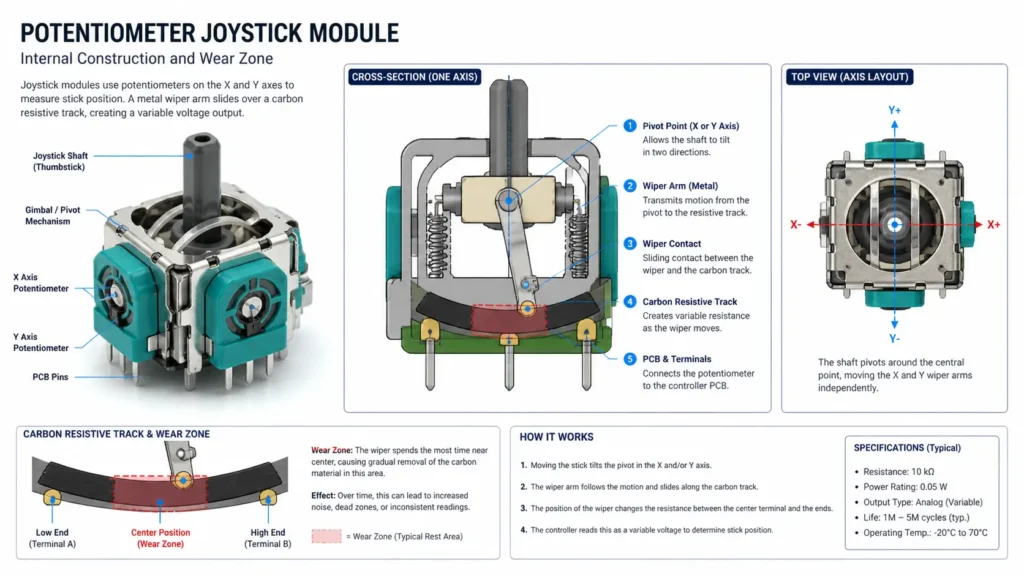
The mechanism is straightforward. Inside the stick module sits a pair of rotary potentiometers, one for the X axis, one for the Y axis. A potentiometer is a resistive track, typically made of carbon-composite material, with a metal wiper contact resting against it.
As the stick moves, the wiper slides across the track. The electrical resistance between the wiper contact and the track’s endpoints changes as the wiper position changes, and that changing resistance value is read by the microcontroller as a proportional analog position value, mapped to a floating-point number between −1.0 and 1.0.
Here’s the thing: the carbon track wears down every time the wiper moves across it. Every FPS session, every stick correction, every menu navigation, each one removes a microscopic layer of material from the track surface.
According to iFixit’s potentiometer analysis, at just two hours of daily FPS play, the wiper contacts inside PS5 DualSense and Xbox Series controllers can reach their rated mechanical lifespan in as little as four to seven months. The worn zone begins to report inconsistent resistance values even at rest, producing the non-zero resting axis offset that games interpret as stick input.
Drift isn’t a sudden failure. It’s a gradual signal degradation.
What most guides skip is that the pre-drift stage is measurable before it becomes disruptive. A worn potentiometer produces increasing signal noise at its resting position; the axis value fluctuates between 0.01 and 0.04 instead of holding exactly at 0.0.
A browser-based gamepad tester like gamepadtester.net shows this directly as a non-zero resting offset. Players who check this value monthly can watch the degradation progress in real time and decide when to intervene before the drift becomes game-breaking, rather than discovering it mid-match.
READ MORE → 6 methods to fix controller stick drift from deadzone workaround to Hall effect upgrade
Hall Effect Sensors – The Hardware That Doesn’t Wear Out
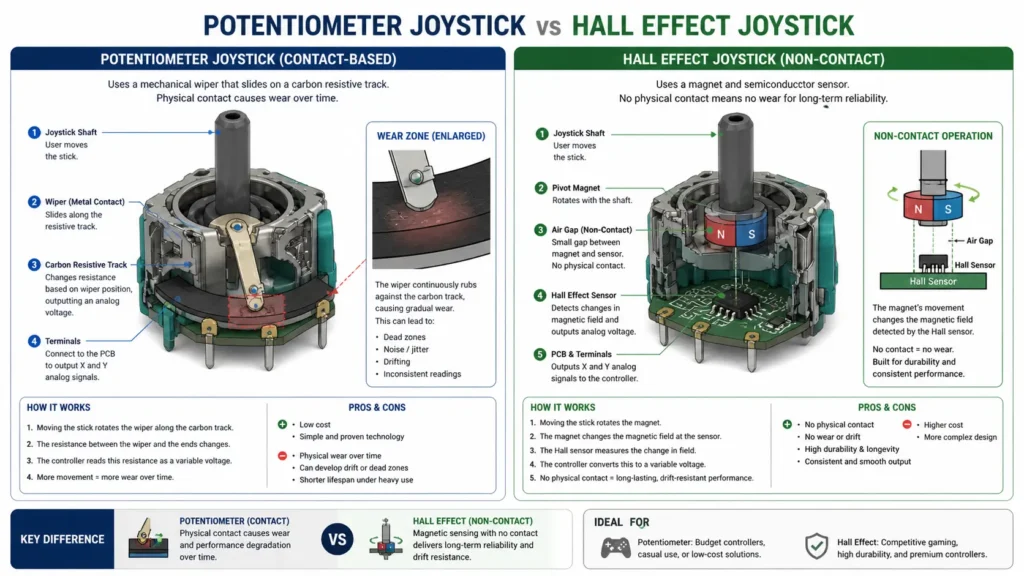
Hall effect joystick sensors replace the resistive potentiometer with a fundamentally different physical mechanism. Instead of a wiper sliding on a carbon track, a Hall-effect sensor reads the position of a permanent magnet mounted to the stick’s pivot shaft.
As the shaft rotates, the magnet’s orientation relative to a stationary semiconductor sensor changes, and the sensor measures that change as a varying voltage output proportional to stick position.
No physical contact. No friction. No carbon track to wear down.
According to iFixit’s Hall Effect Joystick Wiki, the theoretical lifespan of a Hall effect joystick module is orders of magnitude beyond a resistive potentiometer under equivalent use conditions.
The mechanism degrades only if the magnet or semiconductor fails, which occurs on timescales of decades under normal operating conditions rather than months. The sensor produces inherently lower signal noise at rest, since the output is a smooth magnetic field measurement rather than the electrically noisy output of a worn resistive contact.
The practical consequence is visible in the resting axis values. A new potentiometer-based stick reads 0.0 to 0.01 at rest. An aged one reads 0.04 to 0.15 and climbing. A Hall effect stick reads 0.00 to 0.02 at rest and holds that value indefinitely under normal use. The baseline doesn’t creep upward over time the way a potentiometer’s does.
Hall effect vs. potentiometer joystick: A Hall effect module is better suited for any player who games more than ninety minutes daily and wants a sensor that doesn’t require replacement or cleaning within its first year, because the non-contact magnetic design has no physical wear mechanism under normal play conditions.
A potentiometer module is better suited for the lowest-cost scenario where upfront price is the dominant factor, accepting that the sensor will require replacement or deadzone compensation within months to years.
The key difference is mechanism: potentiometers degrade predictably through contact wear; Hall effect sensors do not degrade through use in the same way.
Controllers using Hall effect joysticks as standard include the GuliKit KingKong 2 Pro, cited in PC Gamer and Windows Central as the most widely reviewed Hall effect gamepad, and the 8BitDo Ultimate Controller, frequently cited as the strongest value Hall effect option for PC and Nintendo Switch, with dedicated configuration software and a charging dock.
Both use Hall effect sensors in the sticks and triggers simultaneously, eliminating the two most common sites of mechanical wear in a standard gamepad.
LEARN MORE → iFixit Hall Effect Joystick Wiki
Buttons, Triggers, and Polling – The Rest of the Hardware That Actually Matters
Face Buttons – Membrane vs. Tactile Switch
Standard gamepad face buttons use a rubber dome membrane design. Under each button cap sits a rubber dome with a conductive carbon contact at its interior peak.
When pressed, the dome collapses and the contact bridges two traces on the PCB below, completing a circuit that the microcontroller reads as a button press event. When released, the dome’s elasticity pushes the cap back to the neutral position.
Membrane buttons are quiet, cheap to manufacture, and have no mechanical click. Their failure mode is dome fatigue after tens of thousands of actuations; the rubber loses elasticity and begins to feel mushy before eventually failing to register presses consistently. Users who notice a button requiring more force to register than it used to are observing early membrane fatigue.
The alternative is a tactile switch, a small mechanical switch with a physical spring-loaded mechanism that produces a distinct click on actuation. Tactile switches are used in some premium and pro-tier controllers.
They have a defined actuation force, produce consistent feedback across their rated lifespan (typically 10–50 million actuations for quality components), and don’t develop the soft-press ambiguity that membrane fatigue produces. The trade-off is click noise, which is divisive — some players prefer the tactile confirmation, others find it disruptive in shared spaces.
Triggers – Potentiometer-Based Again, With the Same Failure Mode
Analog triggers L2/R2 on PlayStation pads, LT/RT on Xbox, use the same rotary potentiometer design as analog sticks, mounted to the trigger pivot axis. The same wear mechanism applies: a wiper on a carbon track, degrading with use.
Trigger potentiometers typically last longer than stick potentiometers because triggers don’t make the small, rapid, high-frequency micro-corrections that competitive FPS stick inputs require, but the failure mode is identical when it does occur.
The PS5 DualSense replaces the standard trigger potentiometer with an electromagnetic resistance mechanism that allows the adaptive trigger feature to physically vary the force required to pull the trigger. This is mechanically separate from the position sensor, which remains potentiometer-based.
Quick note: GuliKit and Extremerate both produce Hall effect trigger replacements for Xbox Series and DualSense controllers, eliminating potentiometer wear from the trigger axis entirely using the same magnetic sensing principle as Hall effect sticks.
The Polling Microcontroller – How Fast Your Input Actually Reaches the Game
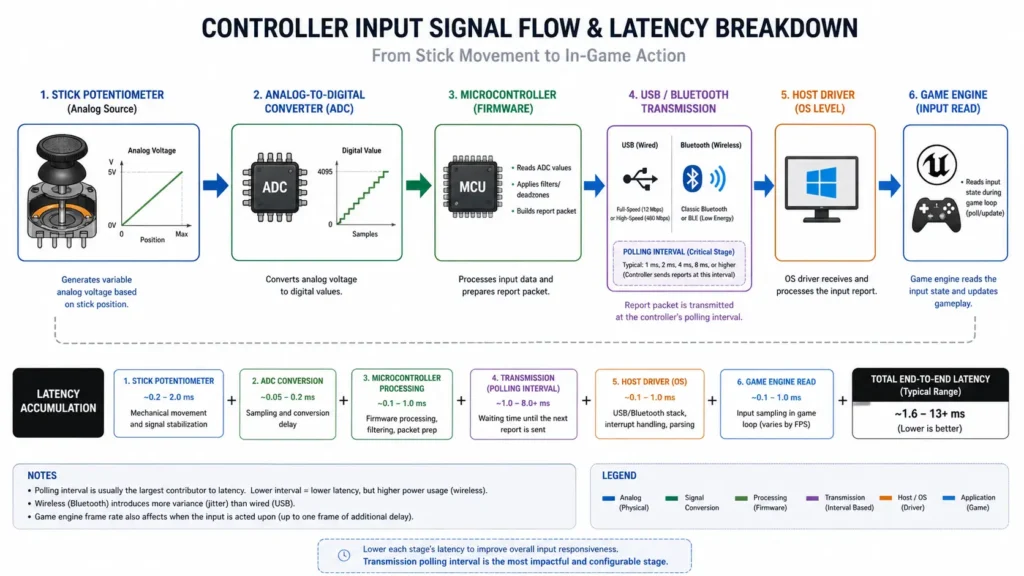
Every input from every component, such as sticks, buttons, and triggers, feeds into the controller’s onboard microcontroller, which packages the complete input state and transmits it to the host device at a fixed interval.
This interval is the polling rate, measured in reports per second (Hz). A polling rate of 1000Hz means the controller sends a complete snapshot of its input state every 1ms. A polling rate of 125Hz means every 8ms.
Most wired gamepads poll at 125Hz or 250Hz by default. The Xbox Series controller polls at 125Hz over Bluetooth and up to 1000Hz over USB when connected through the Xbox Wireless Adapter in wired mode.
The PS5 DualSense polls at 250Hz over USB. These rates determine the minimum possible input latency before any processing overhead is added. A 125Hz controller has a worst-case polling lag of 8ms regardless of connection quality or driver stack.
READ MORE → Controller Latency Explained by Connection Type
Rumble Hardware – Why DualSense Haptics Don’t Work the Same Way on PC
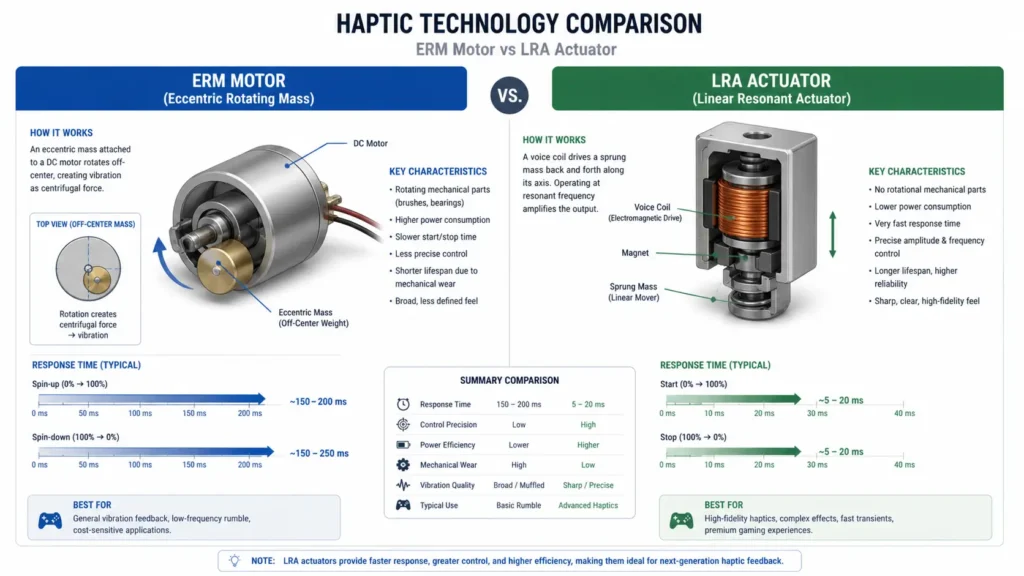
Most controllers use ERM motors, eccentric rotating mass motors, for vibration feedback. An ERM motor is simply a standard DC motor with an unbalanced weight attached to its shaft.
When the motor spins, the off-centre mass creates vibration. Two motors are standard: a large one in the grip for coarse, low-frequency rumble and a small high-frequency one for sharper feedback.
ERM motors produce vibration by running continuously at the speed specified by the game. They have no directional control, no frequency precision below their physical limits, and a response latency of roughly 10–25ms from trigger to perceptible vibration.
The motor needs time to accelerate to its target speed. Players who notice that rumble always feels slightly delayed relative to the on-screen event are observing this spin-up time.
Or maybe I should say: ERM haptics are coarse by design, not by implementation quality. The ceiling is just lower.
The PS5 DualSense uses LRA (linear resonant actuators instead of ERM motors. An LRA contains a mass on a spring driven by electromagnetic force rather than rotation. It produces vibration by resonating at a specific frequency, which can be changed rapidly by altering the driving signal.
Response time is in the range of 3–5ms. Output can be directional different actuators in different parts of the controller, producing independent feedback simultaneously. The haptic effects in supported PS5 games (the sensation of different surface textures in Astro’s Playroom, for example) are produced by precisely timed LRA frequency patterns, not simple on/off rumble.
What most guides skip entirely on this topic: DualSense LRA haptics require game-side audio-pipeline control to produce the complex frequency patterns that make the technology distinctive.
On PC, standard game APIs don’t expose the audio-driven haptic pipeline that Sony’s SDK does on PS5. Games that output DualSense haptics on PC (a small and growing list, including some native PC releases) do so by shipping their own DualSense haptic integration code.
Without that, the DualSense falls back to basic ERM-equivalent rumble output regardless of how good the hardware underneath actually is. The hardware limitation isn’t in the controller; it’s in the API support on the PC side.
Quick Comparison
| Component | Standard Design | Premium Alternative | Key Difference |
| Analog stick sensor | Potentiometer (resistive wiper on carbon track) | Hall effect (magnetic, non-contact) | Potentiometer wears out; Hall effect doesn’t |
| Face buttons | Rubber dome membrane | Tactile mechanical switch | Membrane fatigues the switch has a rated lifespan |
| Trigger sensor | Potentiometer | Hall effect (GuliKit, Extremerate) | Same wear mechanism; same upgrade path |
| Rumble motor | ERM (rotating mass, 10–25ms response) | LRA actuator (PS5 DualSense) | LRA is directional, fast-response, frequency-precise |
| Polling chip | 125–250Hz standard | 1000Hz (Xbox wired mode) | Higher Hz = lower worst-case latency floor |
I’ve Seen Conflicting Claims on This – Here’s My Read
I’ve seen conflicting figures on exactly how long potentiometer sticks last before drift becomes noticeable across different player types and use patterns. The iFixit four-to-seven-month figure is based on two hours of daily FPS play, which is a specific and arguably high-intensity use case.
Some hardware community sources report controllers lasting eighteen to twenty-four months at lower intensity play before measurable drift appears. My read: the timeline varies significantly with use intensity, but the direction of travel is always the same. Potentiometer sticks degrade monotonically; the only question is how fast.
Some hardware reviewers argue that the distinction between ERM and LRA rumble is overstated for most players, that basic rumble feedback serves its purpose well enough, and that LRA is a premium edge case. That’s defensible for players who don’t own a PS5 and haven’t experienced DualSense haptics in a well-implemented game.
But the claim breaks down specifically for PC DualSense users who expect PS5-quality haptics on PC the API gap means they won’t get them regardless of controller quality, and understanding why prevents a lot of disappointed hardware returns.
Anyway, the hardware picture is consistent once you see the full stack: potentiometers wear out, Hall effect doesn’t, ERM rumble has a speed ceiling, and LRA needs platform-side API support to reach its ceiling.
Frequently Asked Questions
Q: Why does my controller develop stick drift after just a few months?
A: The analog sticks in all mainstream controllers, PS5, Xbox Series, and Switch use resistive potentiometers with a physical wiper contact that wears down with use. According to iFixit’s analysis, after two hours of daily FPS play, this wear can reach the sensor’s rated lifespan in four to seven months. It’s a design limitation, not a quality control failure.
Q: How do I know if my controller has Hall effect joysticks?
A: Check the manufacturer’s spec page for “Hall effect,” “electromagnetic,” or “magnetic sensor” in the joystick description. Controllers confirmed to use Hall effect sticks include the GuliKit KingKong 2 Pro and 8BitDo Ultimate Controller. Most first-party controllers from Sony, Microsoft, and Nintendo use potentiometers.
Q: Should I upgrade to a Hall effect controller or repair my existing one?
A: If you game more than ninety minutes daily and have experienced drift more than once, a Hall effect controller is the more cost-effective long-term choice. At $50–$80 for a quality Hall effect pad versus $15–$20 per potentiometer replacement that will fail again, the math shifts toward upgrading after the second repair.
Q: Why don’t PS5 DualSense haptics work the same way on PC?
A: DualSense uses LRA actuators that require game-side audio-pipeline integration to produce complex haptic patterns. On PC, most games don’t implement Sony’s haptic SDK, so the DualSense falls back to basic rumble output, regardless of its hardware capability. Only games with native DualSense PC support deliver full haptic effects.
Q: What is the polling rate, and does it matter for casual gaming?
A: Polling rate is how many times per second the controller sends input data to the game. 125Hz means every 8ms, 1000Hz means every 1ms. For casual gaming, the difference is imperceptible. For competitive FPS play, a higher polling rate reduces worst-case input latency and is worth enabling if your hardware and connection type support it.
This guide covers the internal hardware of mainstream gamepads, including PS5 DualSense, Xbox Series X|S controllers, Nintendo Switch Joy-Cons, and third-party PC gamepads. It does not cover arcade stick hardware, racing wheel encoder mechanisms, VR controller tracking hardware, or the specific PCB designs of individual controller revisions those topics involve different component classes not addressed here.